

Night shifts that cross midnight
Overnight shifts are handled as one shift, for clashes, rest and hours.
Built for agencies that supply workers by the shift — care, warehousing, hospitality, events. See the whole week on one screen, fill gaps in a click, let workers claim shifts on their phones, and go from confirmed hours to a sent invoice without re-keying a thing.









The recruitment CRM trusted by UK agencies placing every day
Every shift filled, every worker cleared before they're booked, every hour on an invoice.
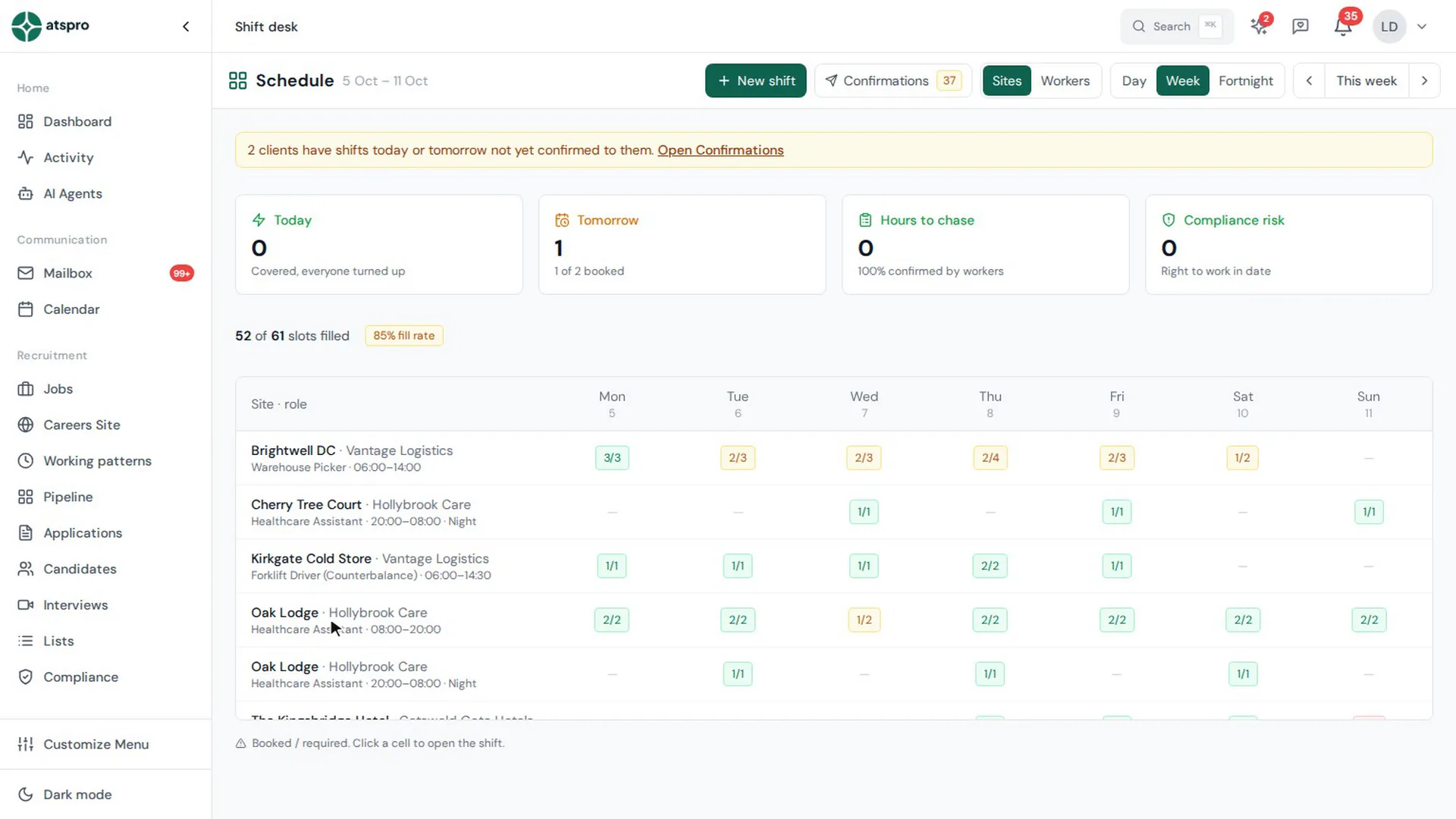
One screen for the week. Every site, every day, with your fill rate.
Filled in a click. Workers ranked by who's most likely to say yes.
Checked before booking. Right to work, DBS, references, double-booking and rest.
Hours to invoice. Worker confirms, client approves, invoice goes out.
Every client site down the side, every day across the top. Each cell shows booked against required — green filled, amber short, red nobody yet — with your fill rate up top. Day and night shifts at the same site sit on their own lines, so a full day never hides an empty night. Flip to Workers to see your supply the same way.
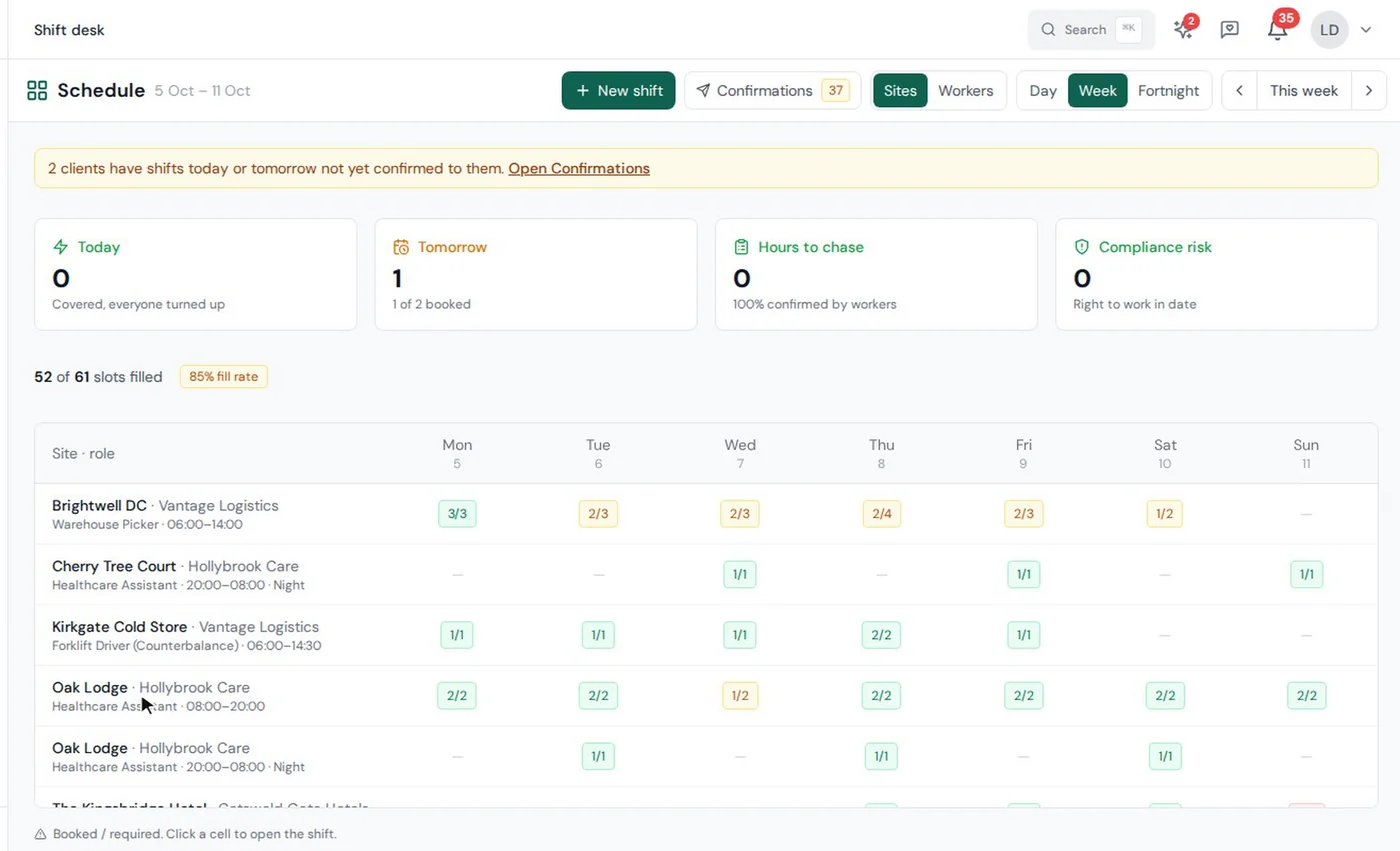
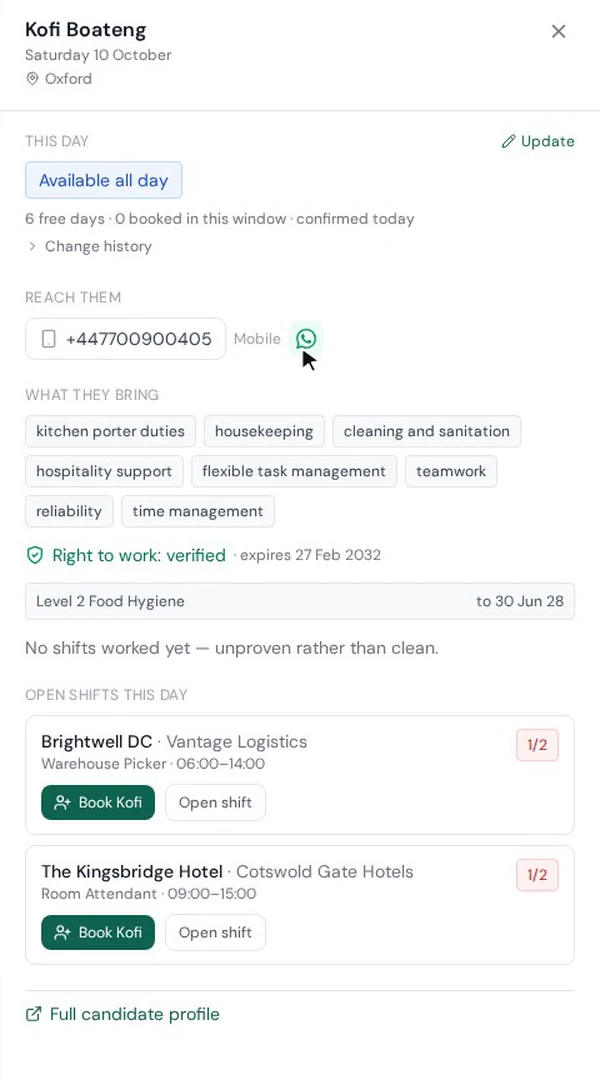
Click a short shift and ATSpro lists who could cover it, ranked by who's most likely to say yes: how close they are, whether they've said they're free, and whether they've worked there before. Book in one click. Anyone who can't be booked tells you why — already working those hours, not enough rest, a lapsed ticket — before you've picked up the phone.
“it's got the functionality you'd typically expect from tools at twice the price”
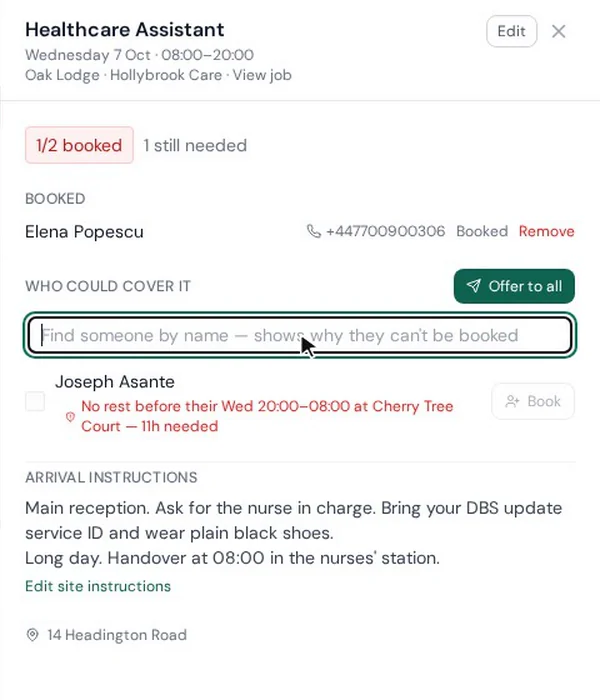
Rather than ringing round, tick the workers you want and press Offer. Each one gets the shift on their phone — the pay, the hours, the site and how to get there. The first to accept gets it, and anyone who opens it afterwards is told it went to someone quicker. No app to install: workers use a secure link.
Free days are money waiting to be made. The Workers view shows who's free and not yet sold, with notes that travel with them. Tick the days you want to sell, click Sell, and ATSpro drafts the availability email for you — each worker's days and the tickets they hold. Pick the client, check the wording, send.
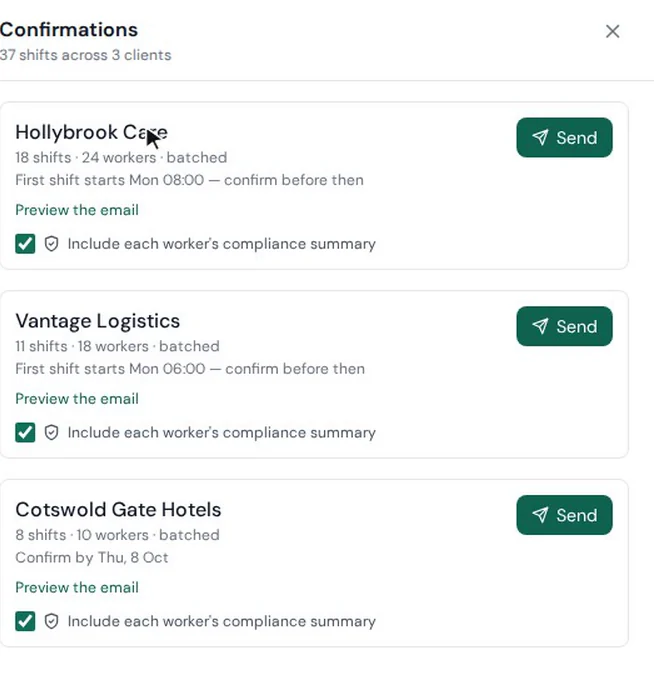
Once shifts are filled, send each client a single email with every shift and every worker — plus a compliance summary for each worker, so the paperwork arrives before they do. Prefer a confirmation the moment each shift fills? Set it per client.
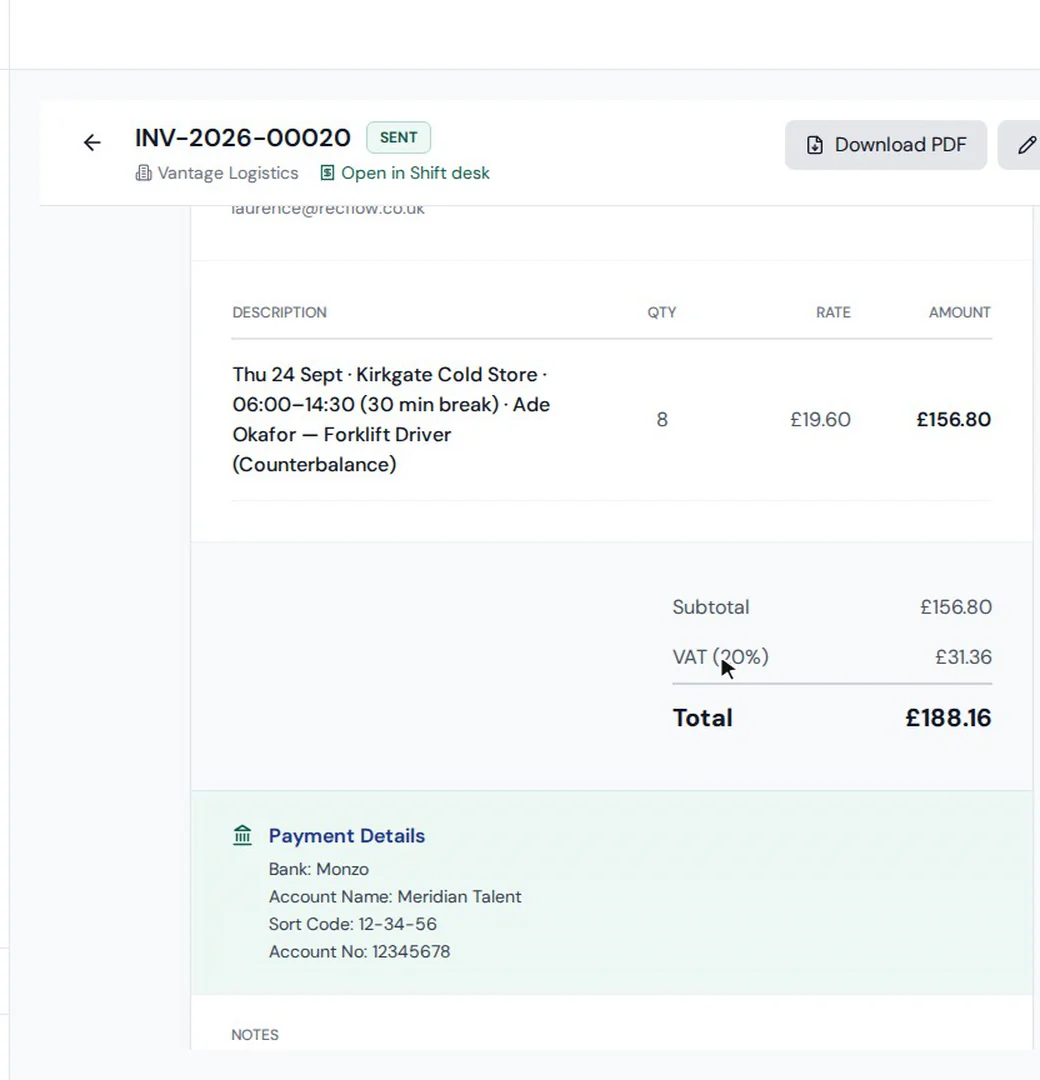
After each shift the worker confirms their hours on their phone. A timesheet is built from them and sent to the client to approve in one click. The invoice is raised from the approved timesheet — VAT and all — and emailed to the billing contact if you've chosen that. You decide when clients are asked and whether invoices go out on their own.
The details that make a shift desk safe to run at speed.
Overnight shifts are handled as one shift, for clashes, rest and hours.
Eleven hours by default, before and after every shift. A client can ask for more.
DBS levels, tickets and references required per client, checked on every booking.
Workers get the details of each assignment with the offer, and can read it again any time.
Premium rates applied from the shift's rate schedule, by bank holiday region.
Offers, confirmations and re-offers go out when you press the button.
Use the Shift Desk when you supply workers by the shift — many short bookings across many sites. Long-term temp and contract placements keep using weekly timesheets. Both end in the same approval and invoicing.
Timesheets & InvoicingPooled medians across our most active agencies, measured in-platform, July 2026. Speed of hire excludes the candidate’s notice period.
“Since implementing ATSpro, we've seen a significant improvement in the way we manage our recruitment process. The platform is intuitive, reliable and has helped us streamline candidate tracking, improve team collaboration and reduce administrative workload.”
All testimonials are from named UK recruiters. Verifiable on LinkedIn.
The Shift Desk is the part of ATSpro built for agencies that supply workers by the shift. It shows every client site and day on one screen, suggests and books eligible workers, sends shift offers to workers' phones, sends booking confirmations to clients, and turns workers' confirmed hours into timesheets and invoices.
No. Each worker has a secure personal link — no app and no password. From it they accept offered shifts, see upcoming and past shifts, confirm their hours, and keep their availability up to date.
ATSpro lists the workers who are eligible for the shift, ranked by how likely they are to say yes: how close they live, whether they've said they're free that day, and whether they've worked at that site before. Workers who can't be booked are left out — and if you search for one by name, ATSpro tells you why.
Every booking — whether you make it or a worker accepts an offer — checks right to work for the date of the shift, the worker's payment type, that they aren't already booked at the same time, and that they'll have had eleven hours' rest. References, DBS and tickets such as a forklift licence or Food Hygiene are checked when your settings, the job or the client require them.
No. Offers go out only when someone on your desk presses Offer. Removing a worker from a shift leaves the gap open and visible without contacting anyone — you decide who to offer it to next.
Clients get booking confirmations by email — one per client for all their shifts, or one per shift, as you prefer — with an optional compliance summary for each worker. Timesheets go to the client's approver, who approves from the email without logging in.
After each shift the worker confirms their hours from their link. ATSpro builds the timesheet, submits it once the week is complete, and sends it to the client to approve. On approval an invoice is created automatically and, if you choose, emailed to the client's billing contact.
Automated data retention, consent tracking, and right-to-be-forgotten workflows.
Your data is isolated and secure. Role-based access controls for your team.
Automated RTW expiry alerts and document verification workflows.
Every connection is encrypted in transit, and your data is encrypted at rest.
Your data is hosted in UK and EU data centres — it never leaves the region.
Book a demo and we'll walk through a week on the Shift Desk — from a gap on the board to an invoice in the client's inbox.