








How it works
Open the map
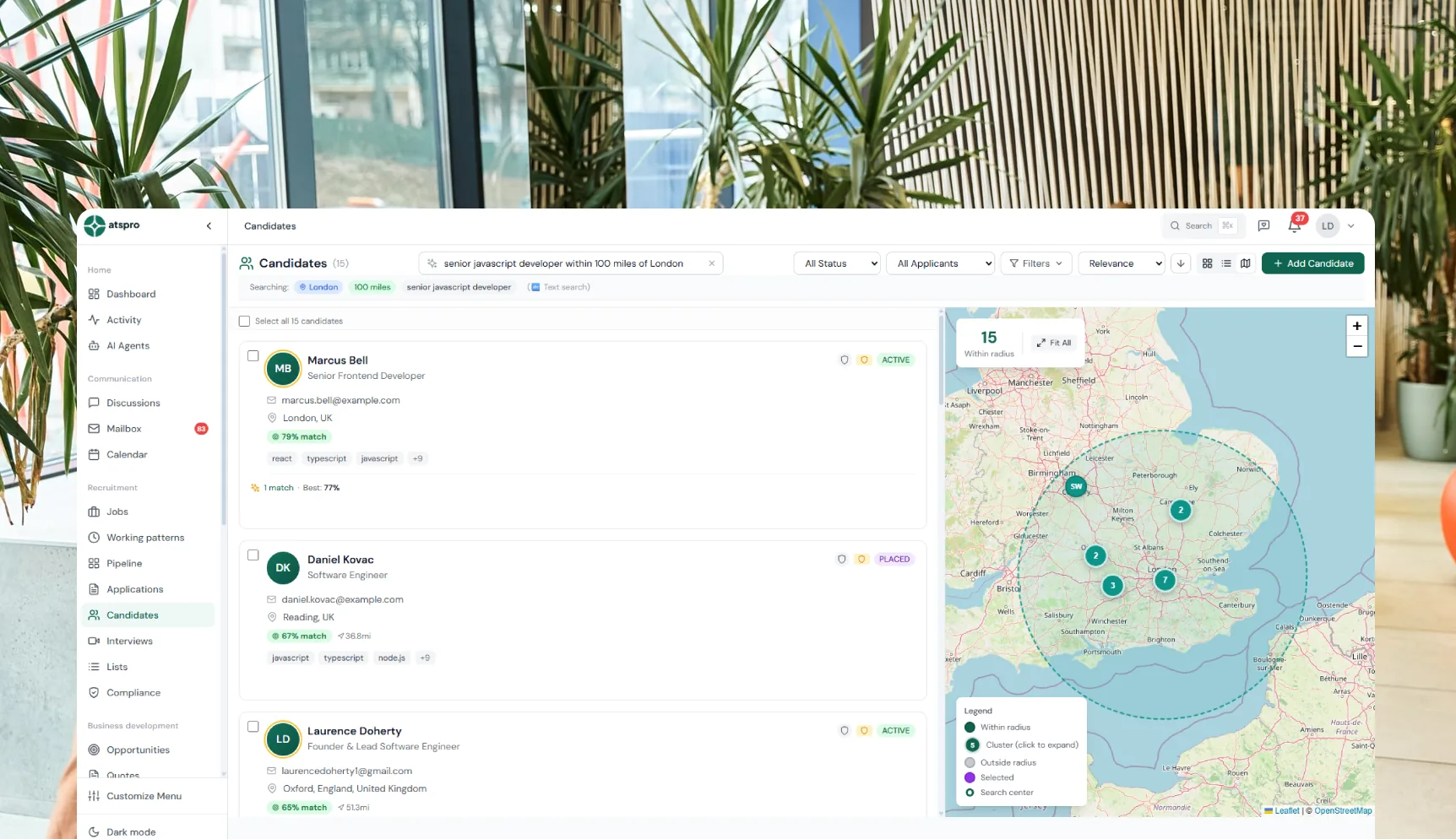
Switch any candidate, contact, or company list to map view. Every record with a known location is plotted as a pin — your entire database, geographically.
Candidates are geocoded from their stored location. Companies show all registered office locations. Contacts appear at their company's address. All three layers can be toggled independently.
Draw a radius
Click any point on the map — an office address, a postcode, a town centre — and drag to set a radius in miles. Everything inside is selected.
Distance is calculated using Haversine formula — accurate to 0.1 mile. The default radius is 25 miles but you can set any distance. Results are sorted by proximity, not alphabetically.
Combine with search
The radius filter stacks with any other search. "React developers within 20 miles of Leeds" is a single query — vector semantic search and location filter applied together.
Works with: skill filters, seniority levels, salary range, availability status, source (database, LinkedIn, sourced), and any combination. Boolean AND/OR/NOT operators also apply.
Select and act
Select individual results or "select all" to grab the entire set. Then bulk enrich, add to a campaign, submit CVs to a client, update status, or export CSV.
Bulk enrichment runs Apollo/Hunter against up to 50 profiles simultaneously in a background job. Campaign enrolment is instant. CV submissions queue for your review before sending.
Six bulk actions
Everything you can do with a selection from a radius search
Real workflows
How recruiters use geographic intelligence day to day
A client calls about a DevOps role in Bristol with a tight deadline. You need candidates who can actually commute.
38 candidates sourced, enriched, and in a campaign in under 5 minutes.
The full sourcing stack
3 minutes from
map to campaign.
14-day free trial · No credit card required · Geographic intelligence included at £49/user