

Real actions, not summaries
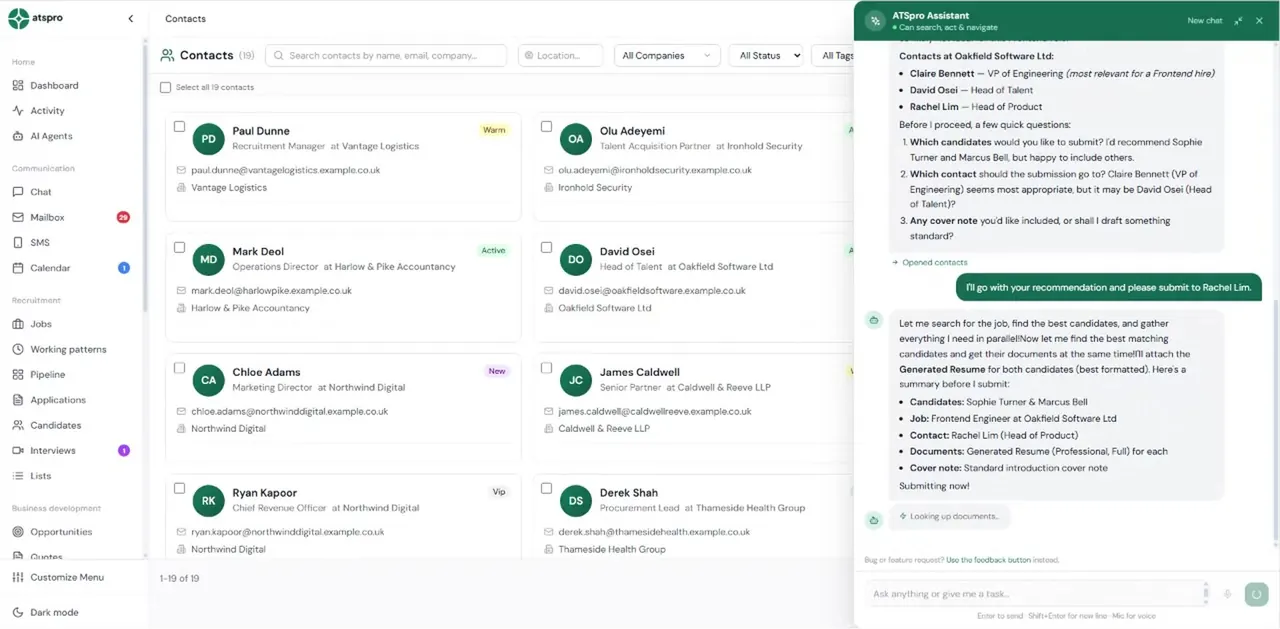
The assistant calls the same service layer as the CRM itself. When it sends an email, the email is sent. When it creates a job, the job exists. It's not generating text about your data — it's operating your CRM.
Most AI tools summarise. ATSpro's AI assistant has 170+ tools that control your entire CRM — finding candidates, sending emails, creating jobs, chasing feedback, and reporting on revenue. All from a single command line.









The recruitment CRM trusted by UK agencies placing every day
Ask in plain English, approve the action, and the CRM does the rest — 170+ tools behind one chat box.
170+ real CRM tools. The same service layer as the app itself.
200 messages per user, per day. History persisted between sessions.
Works from Claude.ai over MCP. OAuth-secured, revokable tokens.
£0 extra per month. Included in every £49 seat.
These are real assistant transcripts, replayed — the questions recruiters actually ask, and how the assistant reads the CRM, takes the action, and shows its working.
What needs my attention today?
The assistant calls the same service layer as the CRM itself. When it sends an email, the email is sent. When it creates a job, the job exists. It's not generating text about your data — it's operating your CRM.
Query candidates, create jobs, send emails, build campaigns, report on revenue, approve AI actions, log RTW checks — every major CRM function has a corresponding tool the assistant can call.
When the assistant navigates to a candidate or job, the application UI moves there automatically. You don't have to click around after asking — it takes you there.
A per-user daily quota keeps usage fair across your team. Conversation history is persisted with token-aware truncation so the assistant remembers context within a session.
Outbound emails, CV submissions, and invoices show you a preview before sending — you approve before anything leaves ATSpro. Ask for a draft, review it, send it. The judgement stays yours.
The assistant is for interactive, on-demand requests. The 6 AI agents run in the background handling the recurring lifecycle work. Together they cover both reactive and proactive automation.
“it's got the functionality you'd typically expect from tools at twice the price”
Ask about a candidate and the assistant opens their record as it answers — CV, timeline, compliance, submissions, all in front of you. It works with your permissions, on your live data, inside the app you already have open. No copy-pasting between a chat window and your CRM: the chat window is the CRM.
Every tool with an example prompt and what it returns
Full tool list grows with every release. Current count: 170+
| ATSpro | Bullhorn | Vincere | |
|---|---|---|---|
| Takes real actions in CRM | ✓ | ✗ | ✗ |
| Sends emails on your behalf | ✓ | ✗ | ✗ |
| Creates jobs and records | ✓ | ✗ | ✗ |
| Reports on revenue | ✓ | Reports only | Reports only |
| AI summaries and insights | ✓ | ✓ | ✓ |
| Operates within your existing UI | ✓ | ✗ | ✗ |
| Included in base price | ✓ | Add-on | Partial |
The assistant is you-driven: you ask, it acts, in the moment. The 6 agents are the other way round — they work in the background and file drafted actions for your approval. Most teams use both: the assistant for everything ad hoc, the agents for the routine lifecycle work.
Meet the 6 AI agentsConnect your mailbox, load your candidates, and ask the assistant to do something real. Every action previewed before it goes — no card required.
Start Free Trial — No Card NeededPooled medians across our most active agencies, measured in-platform, July 2026. Speed of hire excludes the candidate’s notice period.
“Since implementing ATSpro, we've seen a significant improvement in the way we manage our recruitment process. The platform is intuitive, reliable and has helped us streamline candidate tracking, improve team collaboration and reduce administrative workload.”
All testimonials are from named UK recruiters. Verifiable on LinkedIn.
The ATSpro AI assistant is a conversational command interface for the recruitment CRM, powered by Claude Sonnet 4. It has 170+ tools that take real actions — finding candidates, sending emails, creating jobs, scheduling interviews, chasing feedback, generating reports, and approving AI agent actions. It is included in the £49 per user per month price.
Bullhorn Copilot summarises records and answers search queries — it is read-only. The ATSpro AI assistant takes real actions in the CRM: it can send an email, create a job, move a candidate through a pipeline stage, generate a CV submission, or chase post-interview feedback. The ATSpro AI assistant is included at £49 per user; Bullhorn Copilot is a separate paid add-on.
Yes. The AI assistant has 170+ tools that call the same service layer as the CRM itself, so anything a recruiter can do in the UI, the assistant can do from a chat interface. When the assistant navigates between records, the app moves automatically. Sensitive actions (sending external emails, submitting CVs, launching campaigns) can require human approval before execution.
Each user has a daily quota of 200 messages to the AI assistant, which resets each day. Conversation history is persisted with token-aware truncation so longer threads work seamlessly. Most recruiters use a fraction of the daily quota.
Yes. The same 170+ tools are exposed via an MCP (Model Context Protocol) server with full OAuth 2.0 PKCE flow. This means Claude.ai users can connect their ATSpro account directly and operate their CRM from Claude.ai conversations. Access tokens last 90 days and are user-revokable from settings.
Automated data retention, consent tracking, and right-to-be-forgotten workflows.
Your data is isolated and secure. Role-based access controls for your team.
Automated RTW expiry alerts and document verification workflows.
TLS 1.2+ on every connection (SSL Labs grade A+), data encrypted at rest, and AES-256 for credentials and bank details.
Your database, files and backups are stored in London. The application runs on servers in the Netherlands (EU).
14-day free trial · No credit card required · Full assistant access from day one